
 Shop By Category
No products in the cart.
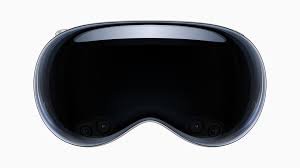
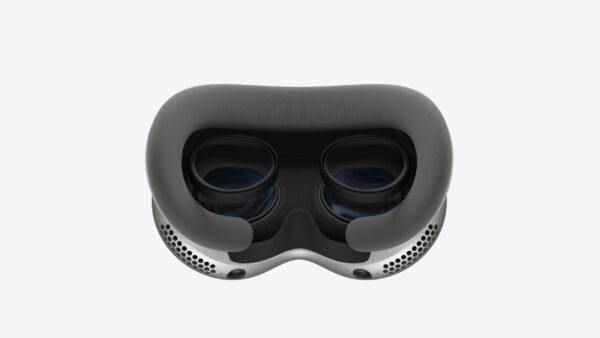
Apple vision pro
- VR & AR Headset
- Suitable For Entertainment
- OLED Display
- Custom Prescription Lenses Lens
- Vision OS, Optic ID for Privacy, Built-in cooling, Stereoscopic 3D illusion Functions
- Prescription Glass Friendly
- OLED
- Wi-Fi
KSh 600,000.00
Apple vision pro
KSh 600,000.00
Description
The Apple Vision Pro has two main versions: the original M2 model and the updated M5 model.
Here is a consolidated table of the key specifications, highlighting the differences where they exist:
Apple Vision Pro Key Specifications
| Feature | Vision Pro (M2 Model) | Vision Pro (M5 Model) |
| Chips | Apple M2 & Apple R1 | Apple M5 & Apple R1 |
| M-Chip Specs | 8-core CPU, 10-core GPU, 16-core Neural Engine, 16GB Unified Memory (100 GB/s bandwidth) | 10-core CPU, 10-core GPU (with HW ray tracing), 16-core Neural Engine, 16GB Unified Memory (153 GB/s bandwidth) |
| R1 Chip Latency | 12-millisecond photon-to-photon latency (256GB/s bandwidth) | 12-millisecond photon-to-photon latency (256GB/s bandwidth) |
| Storage Options | 256GB, 512GB, 1TB | 256GB, 512GB, 1TB |
| Display | Dual Micro-OLED (23 million pixels combined, 3D display system, 7.5-micron pixel pitch) | Dual Micro-OLED (23 million pixels combined, 3D display system, 7.5-micron pixel pitch) |
| Refresh Rates | 90Hz, 96Hz, 100Hz | 90Hz, 96Hz, 100Hz, 120Hz |
| Camera System | Stereoscopic 3D main camera (6.5 stereo megapixels) for spatial photo/video capture | Stereoscopic 3D main camera (6.5 stereo megapixels) for spatial photo/video capture |
| Sensors | 2 Main Cameras, 6 World-Facing Tracking Cameras, 4 Eye-Tracking Cameras, TrueDepth Camera, LiDAR Scanner, 4 IMUs, Flicker Sensor, Ambient Light Sensor | Same as M2 Model |
| Biometric Auth. | Optic ID (Iris-based) | Optic ID (Iris-based) |
| Connectivity | Wi-Fi 6 (802.11ax), Bluetooth 5.3 | Wi-Fi 6 (802.11ax), Bluetooth 5.3 |
| Input | Hands, Eyes, Voice (supports Bluetooth accessories) | Hands, Eyes, Voice (supports Bluetooth accessories) |
| General Use Battery | Up to 2 hours | Up to 2.5 hours |
| Video Playback | Up to 2.5 hours | Up to 3 hours |
| Headset Weight | 21.2–22.9 oz (600–650 g) (Varies by band/seal, excluding external battery) | 26.4–28.2 oz (750–800 g) (Varies by band/seal, excluding external battery) |
| External Battery Weight | 353 g | 353 g |
| Operating System | visionOS | visionOS |
SPATIAL COMPUTING
Apple describes its Vision Pro headset as a “spatial computer,” marking a new era in personal computing that transcends the limitations of traditional 2D screens. This innovative idea comes to life through visionOS, the first-ever spatial operating system that effortlessly integrates digital content with the real world.
Core Principles and Experience Merging Digital and Physical: Spatial computing combines virtual experiences—like Augmented Reality (AR), Virtual Reality (VR), and Mixed Reality (MR)—with the user’s actual environment. With the Vision Pro, apps and content break free from the confines of a screen, appearing to hover in the user’s physical space, creating an endless canvas for multitasking.
Intuitive Interaction: The system is designed for the most natural and intuitive inputs: the user’s eyes, hands, and voice. Gaze as a Cursor: Users can browse and select apps or objects just by looking at them.
Pinch and Flick for Action: A simple pinch with your fingers acts like a click to select, while a flick allows you to scroll through content. Voice Commands: Users can take advantage of Siri for voice commands and dictation.
Immersive Environments: Users have the option to view apps in Shared Space (where they coexist with their surroundings) or dive into Full Space (an entirely immersive environment, like a breathtaking landscape or a virtual movie theater screen that feels like it’s 100 feet wide).
Key Technical Enablers The Vision Pro’s ability to create this spatial experience hinges on state-of-the-art hardware and software:
Advanced Sensing: The device features a custom Apple silicon dual-chip design (including the R-series chip), an ultra-high-resolution display system boasting 23 million pixels across two displays, and a collection of 12 cameras, 5 sensors, and 6 microphones. This impressive hardware supports Computer Vision and SLAM (Simultaneous Localization and Mapping) to comprehend the environment, track the user’s position, and accurately anchor digital objects in 3D space.
CHIP
The Apple Vision Pro is driven by the powerful M5 chip, which represents a significant upgrade from the previous M2 generation. Utilizing cutting-edge third-generation 3-nanometer technology, the M5 boasts a 10-core CPU and a 10-core GPU equipped with hardware-accelerated ray tracing. This means you can expect faster processing and graphics performance overall. As a result, users will enjoy noticeably smoother experiences across the board, from quicker app loading times to more responsive web browsing and enhanced visual realism. One of the standout features of the M5 is the remarkable enhancement it brings to the headset’s visuals and display capabilities.
With this chip, the Vision Pro can render 10 percent more pixels on its custom micro-OLED displays, leading to sharper text and more intricate images. Plus, the maximum refresh rate has been bumped up from 100Hz to 120Hz, which significantly cuts down on motion blur, making for a much smoother experience—especially when using the Mac Virtual Display feature. The M5 works in tandem with the dedicated R1 chip, which handles input from the 12 cameras, sensors, and microphones with impressive ultra-low latency. Additionally, the M5 offers significant improvements in AI performance, thanks to its upgraded 16-core Neural Engine and Neural Accelerators integrated into the GPU. This enhanced AI capability allows system-level features, like capturing a Persona, to be completed up to 50 percent faster, and it can make third-party AI-powered apps run up to twice as fast. Finally, the chip’s energy efficiency means you can enjoy extended use, providing up to 2.5 hours of general use and up to 3 hours of video playback on a single charge.
DISPLAY
he latest refresh rates now go up to 120Hz, a nice bump from the original M2 model’s max of 100Hz. This means you’ll experience less motion blur, which is especially noticeable when you’re checking out your surroundings through passthrough or using the Mac Virtual Display feature. The supported rates now include 90Hz, 96Hz, 100Hz, and 120Hz. Sharper visuals are also on the menu! The M5 chip can render 10 percent more pixels on the same micro-OLED displays compared to the M2 chip. This enhancement allows the display to operate closer to its native resolution, resulting in a sharper image and clearer text across the interface.
External Display (EyeSight): On top of the two internal displays, the Apple Vision Pro features an external, curved lenticular OLED display known as “EyeSight.” This clever display subtly shows a rendered version of your eyes to those around you, giving them a hint about whether you’re aware of your surroundings or fully immersed in an experience.
PRODUCTIVITY
The upgraded Apple Vision Pro with the M5 chip and visionOS 26 is changing the game for personal workspaces by prioritizing smooth performance and comfort, even during those long hours. Thanks to the powerful M5 chip, this headset can handle multitasking like a pro, letting you juggle multiple high-resolution virtual displays without any annoying lag—an absolute must for anyone working on professional projects. One standout feature is the Mac Virtual Display, which now boasts a 120Hz refresh rate. This means text looks sharper, motion blur is minimized, and the overall clarity of your virtual monitors is significantly improved, helping to ease eye strain during those marathon coding or document review sessions. On top of that, visionOS 26 brings in persistent spatial widgets and locked windows, so you can keep essential info—like your calendar or music controls—right where you want them in your physical space. This creates a tidy, dedicated digital command center that helps you stay focused and free from distractions, no matter where you are.
VIRTUAL DISPLAY
The Mac Virtual Display feature on the Apple Vision Pro lets you wirelessly project your Mac’s screen into your visionOS environment, transforming it into a huge, floating virtual monitor. Here’s a quick rundown of the key features and requirements: ✨ Key Features
Massive, Virtual Screen: Your Mac’s desktop shows up as a spacious, private window that you can move around, resize, and position just how you like it. It can feel like you’re looking at a screen that’s over 100 inches diagonally! Aspect Ratio Options (for Apple Silicon Mac & visionOS 2.2+):
You can choose from: Standard (16:9) Wide (21:9) Ultrawide (32:9): This option curves the display around you for a truly immersive experience.
High Resolution: Mac with Apple Silicon (like M1, M2, M5): Supports up to 5K resolution (5120 x 2880) in Standard aspect ratio.
Ultrawide can go up to 10240 x 2880 pixels.
Mac with Intel Processor: Supports up to 3K resolution.
Seamless Input: You can use your Mac’s existing keyboard and trackpad (or mouse) to control the Mac Virtual Display. The pointer can effortlessly glide between the Mac window and your other visionOS apps (as long as Handoff is enabled).
Spatial Audio: Sounds from your Mac (like music and videos) play through the Apple Vision Pro’s audio straps (requires Apple Silicon Mac and visionOS 2.2+).
Multitasking: You can run the Mac Virtual Display alongside other visionOS apps, creating a powerful mixed-reality workspace.
Requirements for Mac Virtual Display To use this feature, you’ll need:
Mac Operating System: macOS Sonoma (14) or later. For Wide/Ultrawide options, you’ll need macOS Sequoia 15.2 or later and visionOS 2.2 or later on your Vision Pro. Networking & Accounts: Both devices must be signed in with the same Apple ID and have two-factor authentication enabled. Wi-Fi and Bluetooth should be turned on for both devices. The Mac and Vision Pro need to be within 10 meters (30 feet) of each other. Limitations: It can only connect to one Mac at a time. It only displays the main screen of your Mac if you have multiple monitors connected.

Reviews
There are no reviews yet.